Send WhatsApp Without Saving Contact
Message any phone number instantly without adding to contacts. Learn why it's important not to save every phone number you come across, and how to send WhatsApp messages without saving their number.
Install Free Chrome ExtensionHow to Send WhatsApp Messages Without Saving Numbers
To do this you can use WaWebM. This tool works on top of WhatsApp and allows you to send messages without saving users to contact. Follow these 5 simple steps:
Install WaWebM Extension
Add the free WaWebM Chrome extension from the Web Store.
Open WhatsApp Web
Launch WhatsApp Web on your desktop and log in by scanning the QR code.
Click on the Sender Button
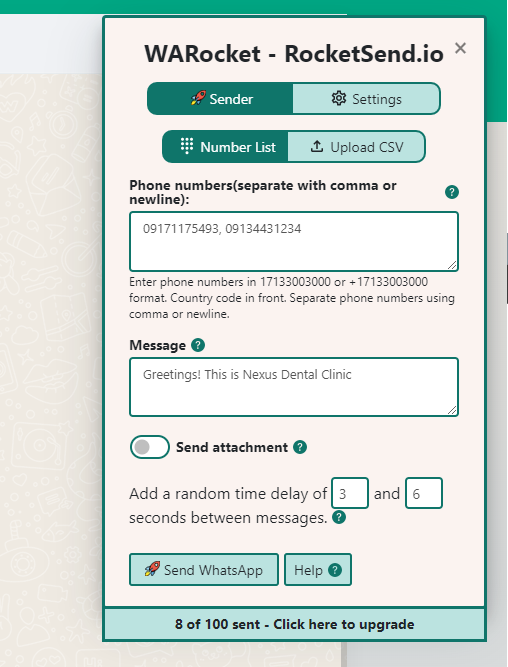
Find the "Sender" button located on the top left corner of your screen in the WaWebM panel.
Add Phone Number & Message
Add the recipient's phone number (with country code, e.g., +1-555-0100) and your message in the popup.
Click Send WhatsApp
Click "Send WhatsApp" to send your message to the recipient. Repeat the process for additional messages or campaigns.
By following these five simple steps, you can easily manage your contacts, create and send messages, and automate your marketing campaigns using WaWebM. The screenshot below shows how the application will look:
Why It's Important Not to Save Every Phone Number
Before we delve into why sending WhatsApp messages without saving numbers matters, it's crucial to understand the importance of not saving every phone number that comes our way.
Protecting Your Privacy
Saving phone numbers on your contact list can be risky, especially if you don't know the person well. Cybercriminals can gain access to your contact list and use it for phishing scams, identity theft, or other malicious activities. By not saving every number you come across, you can minimize your exposure to potential security risks.
Saving Storage Space
Saving too many phone numbers on your device can take up valuable storage space. This can slow down your device's performance and cause it to freeze or crash. By only saving necessary contacts, you can free up storage space and keep your device running smoothly.
Maintaining a Clutter-Free Contact List
Having too many contacts on your list can make it difficult to find the ones you need. It can also clutter your list with irrelevant or outdated numbers, making it harder to keep track of the ones you actually use. By limiting the number of contacts you save, you can maintain a clean and organized contact list.
Instant Messaging
Send messages in seconds, not minutes. With WaWebM, you can quickly reach anyone without the extra steps of saving their contact first.
Tips on Sending WhatsApp Messages to Customers
WhatsApp is a powerful messaging tool that has changed the way we communicate. When it comes to sending messages to customers via WhatsApp, here are some key tips and best practices to ensure the success of your messaging campaign.
Segment Your Customer Base
One of the most critical steps in sending messages to customers is to segment your customer base. This means dividing your customer list into different groups based on demographics, interests, or behavior. By segmenting your customer base, you can send targeted messages that are more likely to resonate with your audience and drive engagement.
Keep Your Messages Short and Sweet
WhatsApp has a limit of 4096 characters for each message, but that doesn't mean you should use all of them. Keeping your messages short and to the point is essential to ensuring that your customers read and engage with your messages. WhatsApp is a mobile-first platform, and users often check their messages on-the-go.
Personalize Your Messages
Personalization is key to making your customers feel valued and engaged. Addressing your customers by name or including personalized information, such as their purchase history or location, can help to create a sense of connection and encourage them to engage with your brand.
Use a Clear Call-to-Action (CTA)
Including a clear call-to-action (CTA) in your messages can help to drive customer engagement and conversion rates. Whether you want your customers to visit your website, make a purchase, or provide feedback, a clear and concise CTA can help to guide them towards the desired action.
Test and Optimize Your Messages
Testing and optimizing your messages is crucial to ensuring the success of your messaging campaign. By testing different messaging strategies and analyzing the results, you can refine your approach and improve your messaging campaign's effectiveness.
Send from CSV, Google Sheets or Excel
You can even send messages from CSV, Google Sheet or Excel files. Upload your contact list and send personalized messages to multiple recipients at once, making your outreach campaigns more efficient and effective.
Complete WhatsApp Messaging Features
Experience the most comprehensive AI-powered WhatsApp messaging solution with enterprise-grade features and intuitive design
AI Message Rewrite
Transform your messages with AI-powered rewrite technology. Choose from professional, friendly, urgent, or casual tones to optimize engagement with WaWebM's advanced AI.
AI Content Generation
Generate compelling messages from simple prompts using WaWebM's AI content assistant. Create professional, engaging content in seconds.
CSV Contact Upload
Upload your contact list from Excel or CSV files and send personalized messages to thousands of contacts simultaneously with WaWebM's advanced messaging capabilities.
Message Personalization
Customize messages with recipient names, company information, and any custom fields from your contact list using WaWebM's personalization engine.
Quick Chat Snippets
Save and quickly access your most commonly used messages with WaWebM's advanced snippet system for improved efficiency.
Privacy Protection
Keep your messages private with blur view, unread message highlights, and other privacy features built into WaWebM for enhanced security.
Send Without Adding Contact
Send WhatsApp messages to any phone number without saving it to your contacts first. Perfect for one-time messages and customer support.
Attachment Sending
Send images, PDFs, documents, and other files to multiple contacts at once. Great for sending catalogs, invoices, or promotional materials.
Chrome Extension
Works seamlessly with WhatsApp Web as a Chrome extension. No separate app or login required - everything works right in your browser.
Conclusion
Being selective about the contacts we save, and only keeping necessary contacts is an important practice that can help us to safeguard our privacy, optimize device performance, and maintain a clean and organized contact list.
Additionally, WaWebM's easy and convenient methods for sending messages to contacts without saving their number can help us to communicate effectively and efficiently, without the need to clutter our contact list with unnecessary numbers.
Whether you're looking to promote a new product, send a special offer, or provide important updates, WhatsApp messaging with WaWebM can help you to reach your customers where they are and drive business results.